

Description
Download AR Drawing Paint Sketch APK – AR drawing, paint and sketch, sketching app, drawing tool, art app, creative app, digital art, drawing on phone, AR sketching, tracing app, art for beginners, drawing tutorial
Overview
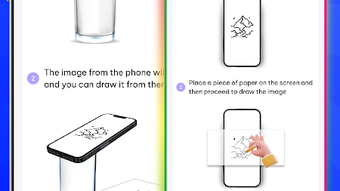
AR Drawing: Paint & Sketch is a mobile-focused creative application designed to empower users of all skill levels to explore digital art through augmented reality (AR) technology. The app enables users to transform real-world images captured via their device’s camera into line drawings, facilitating a seamless transition from observation to creation. It serves as both a sketching tool and an art tutorial platform, supporting users in developing their drawing abilities through guided, step-by-step operations. The app is particularly suited for beginners seeking an accessible entry point into digital art, as well as hobbyists looking to experiment with AR-enhanced drawing techniques. Its core functionality centers on image tracing, allowing users to overlay their sketches on top of photos or artwork, which helps in refining accuracy and confidence. The developer, M. A. M. Studio, appears to focus on user-friendly creative tools, though no further public information about the company is available. Real-world usage includes personal art projects, classroom demonstrations, and social media content creation. The app integrates creative inspiration through tutorials and customizable drawing settings, making it suitable for casual use and structured learning alike.
Key Features & Capabilities
- Augmented Reality Drawing – Utilizes the device’s camera to project real-world images onto the screen, enabling users to draw directly over physical objects or scenes in real time.
- Image Tracing Mode – Allows users to import photos or artwork and trace outlines, simplifying the process of replicating complex shapes and compositions.
- Customizable Drawing Settings – Offers adjustable edge and opacity controls, letting users fine-tune the appearance of their sketches for different artistic effects.
- Multiple Sketch Styles – Provides a variety of line and texture options to emulate different drawing mediums, enhancing creative flexibility.
- Step-by-Step Drawing Guidance – Breaks down complex drawings into manageable stages, supporting users in learning and practicing techniques progressively.
- Sharing and Export Options – Enables easy export and sharing of completed artwork to social media platforms and other digital spaces.
- Integrated Tutorials – Includes instructional content to inspire users and guide them through foundational drawing concepts.
These features support both spontaneous creativity and structured learning. For example, a user can capture a landscape through their phone’s camera and begin sketching it in real time using AR overlay. Similarly, an art student might use the tracing mode to study proportions and anatomy by replicating reference images. The customizable settings allow for experimentation with different visual styles, while the tutorial integration helps users improve over time. The app’s workflow is designed to minimize friction between idea and execution, making it ideal for users who value both artistic expression and educational development.
User Interface, Workflow & Performance
The user interface of AR Drawing: Paint & Sketch appears to be structured around intuitive navigation, prioritizing accessibility for users with limited technical experience. Core tools such as drawing, tracing, and settings are likely organized within a centralized dashboard, allowing quick access during active sessions. The workflow follows a logical sequence: capture or import an image, select a sketch style, adjust settings, begin drawing, and export or share the result. This streamlined process supports efficient creative output without requiring prior training. The app is optimized for Android devices, suggesting compatibility with a broad range of smartphones and tablets. However, exact performance details such as CPU or RAM usage were not specified by the developer. General software behavior patterns suggest stable operation under normal conditions, though performance may vary based on device hardware. No information was provided about crash rates, loading times, or background processes. The developer did not specify resource usage details, so users should expect typical behavior for a mobile drawing application. Stability is presumed to be adequate for regular use, but users are advised to monitor app behavior on their specific devices.
Compatibility & System Requirements
AR Drawing: Paint & Sketch is designed for Android operating systems, with the current version being 2.3.3. The application has a file size of 65.2 MB, indicating a lightweight installation that should not significantly impact storage space on most modern devices. The developer did not provide additional system requirements, such as minimum RAM, processor speed, or Android API level. As a result, compatibility details are limited to the operating system type and version. Users should verify that their device meets general Android app standards for functionality, including camera access and touch responsiveness. The developer did not specify whether the app supports tablet devices or requires specific hardware features like ARCore. Compatibility information was partially provided, and users are encouraged to test the app on their devices to confirm full functionality. No mention was made of cloud sync, offline mode, or multi-device support.
Pros and Cons
Pros
- Intuitive interface suitable for beginners and casual users
- Augmented reality integration enhances real-time drawing experience
- Image tracing mode simplifies the creation of accurate line work
- Customizable drawing styles and opacity settings
- Step-by-step tutorials support skill development
- Lightweight installation at 65.2 MB
- Easy sharing of finished artwork via social platforms
Cons
- Exact system requirements were not listed
- Performance behavior on low-end devices is unknown
- No information on cloud backup or cross-device sync
- Limited developer background or support resources
- Price point may be higher than free alternatives
FAQ Section
Is AR Drawing: Paint & Sketch compatible with all Android devices?
The app is designed for Android, but the developer did not specify minimum system requirements. Compatibility may vary depending on device hardware and Android version.
Is the app safe to download and use?
As a mobile application distributed through official channels, AR Drawing: Paint & Sketch is expected to be secure. However, users should ensure downloads are made from trusted sources.
Does the app require an internet connection?
The app supports offline usage for drawing and sketching. However, some features like tutorials or sharing may require internet access.
How often are updates released?
Update frequency is not specified by the developer. Users are advised to check the app store for the latest version.
What type of license does the app use?
AR Drawing: Paint & Sketch is a paid application with a one-time purchase model. No subscription or trial version details were provided.
Final Thoughts + CTA
AR Drawing: Paint & Sketch delivers a focused and accessible entry into the world of digital art for Android users. Its integration of AR technology, combined with practical features like image tracing and customizable drawing settings, makes it a compelling tool for beginners and hobbyists alike. The app’s lightweight design and intuitive workflow enhance usability, while the inclusion of tutorials supports long-term creative growth. Although limited information about system requirements and developer support is available, the app demonstrates a clear commitment to user-centric design. For those seeking a reliable, affordable drawing tool that blends creativity with learning, this application stands out in its category. Download AR Drawing: Paint & Sketch now and unlock your artistic potential with augmented reality.
Guides & Tutorials for AR Drawing Paint Sketch APK
How to install AR Drawing Paint Sketch APK
- Click the Preview / Download button above.
- Once redirected, accept the terms and click Install.
- Wait for the AR Drawing Paint Sketch APK download to finish on your device.
How to use AR Drawing Paint Sketch APK
This software is primarily used for its core features described above. Open the app after installation to explore its capabilities.
User Reviews for AR Drawing Paint Sketch APK 0
No reviews found





